

Submitting an application for processing
Learn how to submit a loan application from origination to processing, including pre-submission requirements, the submission workflow, and how to track your application's progress through our system.

Pre-Submission Checklist
Before submitting an application, ensure all required information is complete across these key sections:
Borrower Information
- Complete personal information (name, SSN, date of birth, address)
- Demographic information for HMDA reporting
- Alternate contact information
- All borrowers added (if joint application)
Property Information
- Complete property address
- Appraisal information entered
- Property charges entered (mortgages, taxes, HOA)
- Property type and occupancy verified
Financial Information
- Income information entered
- Assets listed
- Liabilities entered or reviewed from credit report
Credit Reports
- Credit reports ordered for all borrowers
- Credit reports received and reviewed
- Credit issues noted (if applicable)
Fees
- All fees entered
- Fees verified against vendor quotes
- Fee amounts are accurate
Calculations
- Principal limit calculated
- Available proceeds determined
- Set-asides reviewed
- Payoffs verified
Documents
- Required documents attached (if any)
- Documents are legible and complete
Submitting to Processing
Step 1: Review the Application
Navigate to the loan application and review all sections for completeness. Verify all data is accurate and check for any validation errors before proceeding to submission.
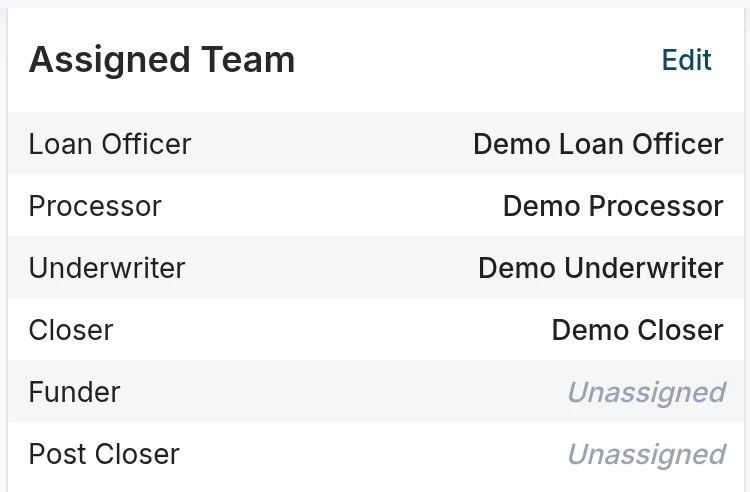
Step 2: Assign a Processor (Optional)
If your company uses processors, find Assigned Team in the loan's Quick Calculations panel and select Edit. In Edit Assigned Team, choose the Processor and select Save Changes. Add any special instructions for the processor as a note on the loan.
Step 3: Submit the Application
Click "Submit to Processing" or change the loan status to "Processing". Add any notes or instructions for the processor, then confirm your submission. The loan status will automatically change from "Origination" to "Processing".
Adding Submission Notes
When submitting your application, include helpful context for your processor:
- Special Instructions: Any specific requirements or considerations for this loan
- Borrower Preferences: Payment plan preferences, disbursement preferences
- Timeline Requirements: Any time-sensitive or deadline-driven requirements
- Special Circumstances: Anything unusual about the application that requires attention
Example notes: "Borrower prefers monthly payments over line of credit. Property has minor repairs needed—see repair section. Borrower needs to close by end of month for tax purposes."
What Happens After Submission
Processing Phase
Once you submit an application, the following activities occur:
- Processor Assigned: The loan is assigned to a processor (if applicable)
- Document Collection: The processor collects all required documents
- Data Verification: The processor verifies all information against source documents
- Third-Party Services: The processor orders services such as appraisal updates, title reports, and flood certificates
- Quality Check: The processor ensures the application is complete and ready for underwriting
Underwriting Phase
After processing is complete, your application moves forward:
- Status Change: The loan status changes to "Submitted to Underwriting"
- Underwriter Review: An underwriter reviews the complete application
- Conditional Approval: The underwriter may issue conditional approval with specific requirements
- Conditions: Any conditions must be cleared before closing
- Clear to Close: Once all conditions are satisfied, the loan clears to close
Tracking Your Application's Progress
Status Updates
After submission, monitor your application's progress through multiple channels:
- View status changes in the loan detail view
- Receive notifications when status changes occur
- Review the activity log for a complete record of all actions
Communication and Questions
Throughout the processing and underwriting phases, you can:
- Add notes at any time to communicate with processors and underwriters
- Respond quickly to processor questions or requests
- Provide additional information as requested
Resolving Submission Issues
Validation Errors
If you encounter validation errors before submission:
- Review the error messages carefully
- Complete all missing required fields
- Fix any data format issues
- Resubmit after making corrections
Status Won't Change
If you're unable to change the loan status to Processing:
- Verify you have permission to submit applications
- Check that all required fields are complete
- Review any validation errors displayed in the application
- Contact your administrator if issues persist
Resubmitting After Changes
If you need to make changes to an application after submission:
- Check Status: Verify the current loan status
- Request Return: If the loan is in Processing, request it be returned to Origination status
- Make Changes: Update the necessary information in the application
- Resubmit: Submit the application again after making corrections
Withdrawing Applications
If you need to withdraw an application:
- Change the loan status to "Withdrawn"
- Add a note explaining the reason for withdrawal
- Document any borrower communication related to the withdrawal
- Update any relevant information in the system
Best Practices for Submission
- Complete Before Submitting: Verify all required information is complete before pressing submit
- Verify Accuracy: Double-check all data for accuracy—errors caught at submission prevent delays later
- Add Helpful Notes: Include clear, specific notes for processors to help expedite processing
- Follow Timeline: Submit applications within your company's expected timeframes
- Communicate Proactively: Stay in communication with processors and underwriters throughout the lifecycle
- Respond Quickly: Answer processor and underwriter questions promptly to keep your loan moving
What You Can Still Do After Submission
Submitting an application doesn't lock it—you maintain visibility and can continue to contribute:
- View loan status and processing progress at any time
- Add notes and comments for the processor team
- Upload additional documents if needed
- Respond to processor questions or requests for information
- Review processing updates and activity logs
Was this article helpful?
Your feedback goes directly to the engineer who wrote it.