

Processing a loan: the processor workflow
A step-by-step guide to the loan processing workflow in ReversePilot, covering document collection, data verification, third-party services, and pre-underwriting quality checks for HECM applications.

Overview
Loan processing is the critical phase between loan submission and underwriting review. During processing, you collect all required documentation, verify borrower and property information, order third-party services (appraisals, title reports, credit reports, and flood certificates), complete the full data entry, and perform quality checks to ensure the application is complete and accurate before handoff to the underwriting team.
This guide walks through the processor workflow step-by-step, from the moment a loan enters the Processing state through submission to underwriting. By the end, you should understand:
- How to organize and collect required borrower, property, and loan documents.
- How to verify all entered information against source documents.
- Which third-party services to order and when.
- The pre-underwriting quality-check checklist.
- How to manage status transitions and add notes for the underwriter.
The processing workflow
Receive Application
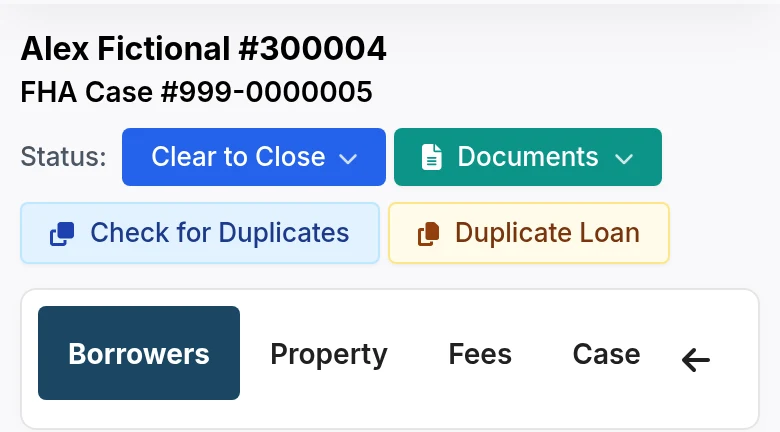
When a loan is submitted for processing, the status changes to Processing and it appears in your work queue. Review the initial application for completeness and familiarize yourself with the borrower profile, property, and loan amount.
Collect Documents
Systematically collect all required borrower, property, and loan documents. Upload each document to its designated section in ReversePilot, with clear naming and descriptions. This step establishes the foundation for all downstream verification and compliance work.
Verify Data
Cross-check all entered borrower, property, and financial information against the source documents. Fix any discrepancies in the system and document resolutions in your processing notes.
Order Third-Party Services
Initiate credit reports, flood certificates, appraisals (if not already ordered), and title reports. Track completion and review each report as it arrives to flag any issues early.
Complete Data Entry
Fill in any remaining gaps in borrower personal information, property details (including appraisal data), and all financial information (income sources, assets, and liabilities). Verify all calculations.
Review and Quality Check
Before submission to underwriting, run through the completeness, accuracy, and compliance checklists. Resolve any outstanding items or flag them for the underwriter with clear notes.
Submit to Underwriting
Change the loan status to Submitted to Underwriting, add a processing summary in the status notes, and highlight any special circumstances or outstanding items. Notify the underwriter if required by your workflow.
Document Collection
Borrower Documents
Collect the following from the borrower or loan officer:
- Identification: Driver's license, passport, or other government-issued ID.
- Social Security Card: Copy of SSN card.
- Income Documentation: Social Security award letters, pension statements, retirement account statements, and bank statements showing regular deposits.
- Asset Documentation: Bank statements (2–3 months current), investment account statements, and any property ownership documents.
Property Documents
Ensure you have obtained:
- Appraisal Report: Complete FHA or conventional appraisal.
- Title Report: Preliminary title report.
- Flood Certificate: Flood zone determination.
- Property Tax Statements: Current-year property tax information.
- Homeowners Insurance: Current insurance policy.
Loan Documents
Collect and verify completion of:
- Credit Authorization: Signed credit authorization forms.
- Disclosures: Initial disclosures (Truth in Lending, Good Faith Estimate, or equivalent).
- Counseling Certificate: HECM counseling certificate (if applicable).
Uploading and Organizing Documents
Navigate to the appropriate section
In ReversePilot, each loan application has distinct sections for Borrower Documents, Property Documents, and Loan Documents.
Click "Upload Document" or "Add Document"
Use the upload button in the relevant section to attach the file.
Enter a clear description
Provide a descriptive name (e.g., "Borrower SSN Card - John Doe" or "Property Appraisal - 123 Main St") so documents are easy to locate and verify later.
Ensure legibility and completeness
Confirm the scanned document is legible, complete (all pages included), and matches the entered data. If a document is partial or unclear, request a better copy before saving.
Save and organize
Save each document in its designated section. Keep related documents grouped for easy reference during verification and underwriting review.
Data Verification
Verification is the cornerstone of accuracy and compliance. For each category, match the system data to the source documents and resolve any discrepancies before moving to the next step.
Borrower Information
Cross-check the following against identification documents and supporting records:
- Names (first, middle, last) match the government-issued ID exactly.
- Social Security Number matches the SSN card.
- Date of birth matches the ID.
- All addresses (current and previous) match documentation.
Property Information
Verify property details against the appraisal report and title report:
- Property address is complete and accurate.
- Appraised value matches the appraisal report.
- Property type (single-family, condo, etc.) and occupancy status are correct.
- All liens, encumbrances, and property charges match the title report.
Financial Information
Verify income, assets, and liabilities using supporting documentation:
- Income amounts match Social Security award letters, pension statements, or other income documentation.
- Asset values match bank statements and investment account statements.
- All liabilities and debts are accounted for in the credit report.
- Calculations (net worth, debt-to-income ratios) are accurate.
Ordering Third-Party Services
Credit Reports
- Verify credit reports have been ordered for all borrowers.
- Review the report data upon receipt, including credit score, payment history, and open accounts.
- Note any credit issues (late payments, collections, bankruptcies) and document them in your notes.
- Ensure all borrowers on the application have been pulled and reviewed.
Flood Certificate
- Order the flood certificate if not already obtained during origination.
- Review the flood zone determination upon receipt.
- If the property is in a flood zone, note insurance requirements and confirm the borrower is aware.
Title Services
- Order the title report if not already obtained.
- Review for any liens, encumbrances, or ownership issues.
- Verify that the named borrower is the property owner (or co-owner) and flag any discrepancies.
- Check for any title defects or claims that may affect the loan.
Appraisal
- Verify the appraisal has been ordered (if not already completed).
- Upon receipt, confirm the appraised value and property condition assessment.
- Update the system with appraisal data and flag any property condition issues for underwriting review.
Completing Data Entry
Use the collected documents and third-party reports to fill in any remaining gaps in the application:
Borrower Information
- Complete any missing personal information (middle name, suffix, alternate contact).
- Fill in demographic information required for HMDA reporting.
- Enter license information or professional credentials if applicable.
Property Information
- Enter the complete property address and legal description.
- Add appraisal data (appraised value, condition, square footage, year built).
- Enter all property charges (liens, mortgages, homeowners association fees).
- Complete property tax information from tax statements.
Financial Information
- Enter all income sources (Social Security, pension, employment, investment income).
- List all assets with current values and account types.
- Record all liabilities (credit cards, auto loans, personal loans) with balances and monthly payments.
- Verify all calculations (net worth, debt-to-income ratio, residual income if applicable).
Pre-Underwriting Quality Check
Before changing the status to Submitted to Underwriting, walk through this checklist to ensure completeness, accuracy, and compliance:
Completeness Check
- All required documents have been collected and uploaded.
- All data fields are complete (no blank required fields).
- All third-party services (credit, appraisal, title, flood) have been ordered and received.
- Credit reports have been reviewed and any issues documented.
- All calculations have been verified for accuracy.
- All fees have been entered and verified.
Accuracy Check
- All entered information matches the source documents.
- Names and addresses are spelled correctly and match IDs.
- Financial information (income, assets, liabilities) is accurate and supported by documentation.
- Property information matches the appraisal and title reports.
- Calculations are mathematically correct.
Compliance Check
- HMDA data is complete and accurate.
- All required disclosures have been generated and sent to the borrower.
- Counseling certificate has been obtained (if required).
- All required signatures have been obtained.
Communication During Processing
With Loan Officers
Keep the loan officer informed and engaged:
- Request missing information or documents promptly, with clear timelines.
- Clarify any discrepancies or data inconsistencies.
- Provide regular status updates, especially on third-party service timelines.
- Coordinate document collection to keep the process moving smoothly.
With Borrowers
Maintain professional communication with the borrower:
- Request additional documents when needed, explaining why they are necessary.
- Clarify any information questions, especially regarding financial data.
- Provide status updates to keep them informed of progress.
- Coordinate any in-person appointments or meetings if needed.
With Third-Party Vendors
Manage vendor relationships to keep services on track:
- Order services promptly with clear instructions and timelines.
- Track service completion and follow up on delays.
- Review service results as they arrive (credit reports, appraisals, title reports).
- Escalate any issues or concerns immediately.
Status Management and Underwriter Handoff
Status Transitions
ReversePilot uses the following status markers during and after processing:
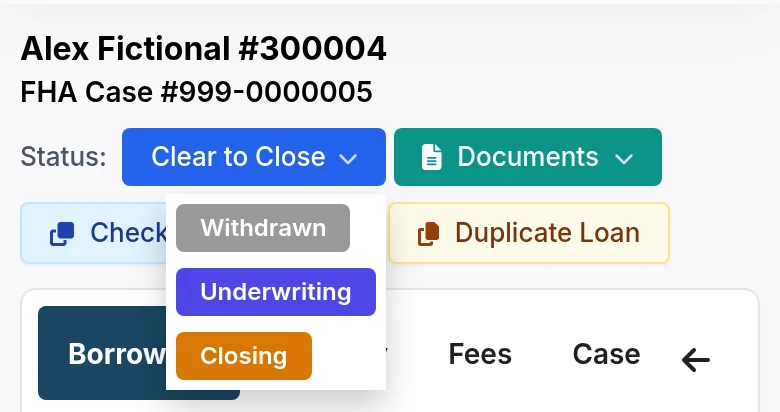
- Processing: Application is being actively processed.
- Submitted to Underwriting: Processing is complete; application is ready for underwriter review.
- Underwriting: Underwriter is reviewing the application.
Submitting to Underwriting
Once all quality checks are complete:
Update the status
Change the loan status from Processing to Submitted to Underwriting in the system.
Add processing notes
Write a brief summary of the processing phase, including completion of key milestones and any outstanding items that the underwriter should be aware of.
Highlight special circumstances
If there are any unusual situations, late documents, or issues discovered during processing, note them clearly for the underwriter's attention.
Notify the underwriter (if required)
Depending on your workflow, send a notification to the assigned underwriter or to the underwriting queue so they can begin their review.
Best Practices
Keep these principles in mind throughout the processing workflow:
- Be Thorough: Complete all required tasks before moving forward. Incomplete processing creates rework for underwriters.
- Be Accurate: Verify all information carefully and resolve discrepancies. Accuracy prevents costly delays later.
- Be Organized: Keep documents organized and clearly named. Good organization saves time and reduces errors.
- Be Timely: Move loans through processing efficiently and keep stakeholders informed of timelines and delays.
- Be Communicative: Maintain clear, professional communication with loan officers, borrowers, and vendors. Regular updates prevent surprises.
Troubleshooting Common Issues
Missing Documents
When borrowers or loan officers do not provide required documents:
- Contact the loan officer or borrower immediately with a clear list of missing items.
- Set a specific deadline for document receipt.
- Document the request in your processing notes with timestamps.
- Follow up regularly on outstanding items and escalate if necessary.
Data Discrepancies
When system data does not match source documents:
- Verify the discrepancy against the source document — do not assume the system entry is wrong.
- Contact the loan officer or borrower for clarification.
- Document the resolution and update the system with the verified information.
- Note the correction in your processing notes for underwriter awareness.
Service Delays
When third-party services (appraisal, title, credit) are delayed:
- Follow up proactively with the vendor to confirm receipt of the order and estimated completion date.
- Document delays in your processing notes.
- Communicate with the loan officer and borrower about expected timeline adjustments.
- Escalate delays to management if they risk missing SLAs or underwriting timelines.
Was this article helpful?
Your feedback goes directly to the engineer who wrote it.