

Ordering flood certificates
ReversePilot integrates with FloodCert.org to automatically retrieve and order flood zone certificates for properties in reverse mortgage applications. Learn how to request flood zone information and ensure compliance with federal flood insurance requirements.

Overview
ReversePilot integrates with FloodCert.org to automatically retrieve flood zone information for properties involved in reverse mortgage applications. This integration ensures your loans meet federal regulations regarding flood insurance requirements and streamlines the process of obtaining flood certificates.
Flood zone determination is a critical compliance requirement in reverse mortgage lending. When you order a flood certificate through ReversePilot, the system submits your property details to FloodCert.org and retrieves the official flood zone designation for the property.
Preparing property information
Before ordering a flood certificate, ensure that the property address information is complete and accurate in your loan application. The address you provide must match the property records used by FloodCert.org for the lookup to succeed.
Enter the property address
When creating a new loan application, complete all property address fields: street number, street name, city, state, and ZIP code. Verify that the address is spelled correctly and matches the property's official records.
Verify borrower information
Ensure that the primary borrower's name is entered correctly in the loan. This information is required when ordering the flood certificate and will be included in the certificate documentation.
Ordering a flood certificate
To request a flood certificate from FloodCert.org, you must explicitly initiate the request through ReversePilot. The system will submit your property and borrower details to the FloodCert.org API.
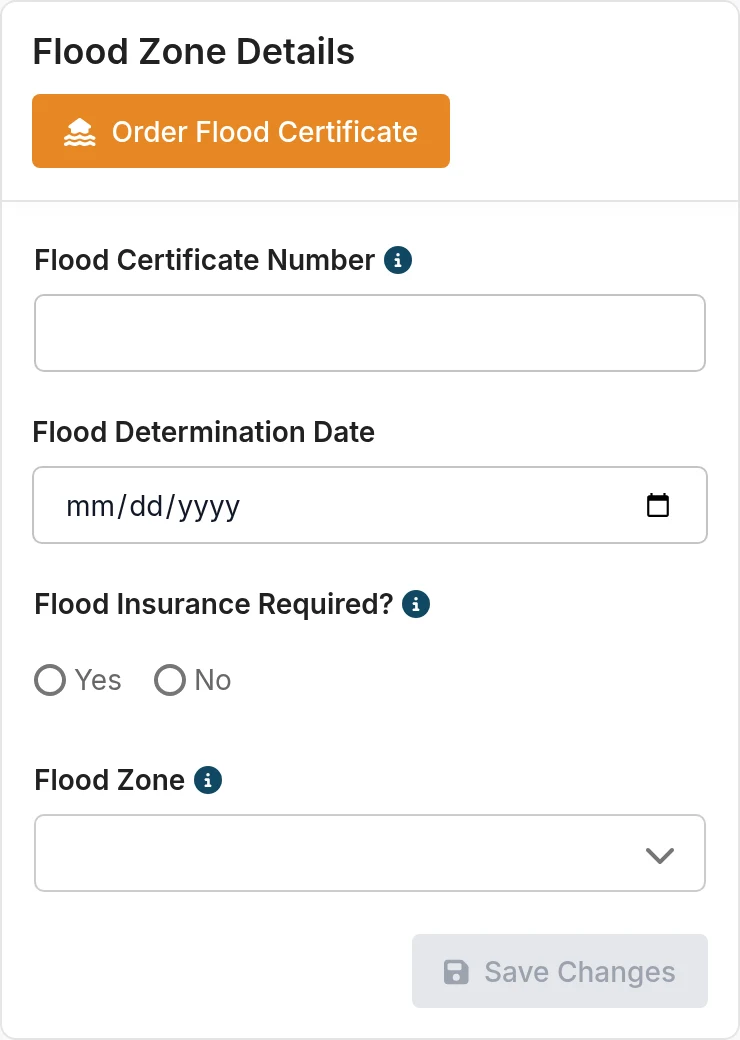
Access the flood zone section
Navigate to the Flood Zone section of your loan application in ReversePilot.
Initiate the certificate request
Click the button to request flood zone information from FloodCert.org. The system will submit the following information:
- Property address (street, city, state, ZIP)
- Loan number
- Lender ID (from your configured FloodCert.org account)
- Borrower name
Wait for processing
Certificate requests typically take a few moments to process. The system will retrieve the flood zone data from FloodCert.org and display the results in your loan application.
Viewing flood zone results
Once the flood certificate request is processed, ReversePilot displays the flood zone information in the loan application's Flood Zone section. The following data is captured and stored:
floodZone- The official FEMA flood zone designation for the propertyfloodCertificateNumber- The unique certificate number assigned by FloodCert.orgfloodDeterminationDate- The date of the flood zone determinationfloodInsuranceRequired- Whether flood insurance is required based on the zone designation
Use this information to determine whether the loan requires flood insurance and to communicate flood risk status to the borrower and other parties involved in the transaction.
Supported flood zones
ReversePilot supports the full range of FEMA flood zone designations, including:
- Special Flood Hazard Areas: Zone A, Zone AO, Zone AH, Zones A1-A30, Zone AE, Zone A99, Zone AR, and composite zones (Zone AR/AE, Zone AR/AO, Zone AR/A1-A30, Zone AR/A)
- Coastal High Hazard Areas: Zone V, Zone VE, Zones V1-V3
- Moderate-to-Low Risk Areas: Zone B, Zone X, Zone C, Zone D
API requirements
To use the flood certificate integration, you must configure FloodCert.org API credentials in ReversePilot. The system checks for credentials at two levels:
- User-level API key: If your user account has a FloodCert.org API key configured, ReversePilot uses that key for certificate requests.
- Company-level API key: If a user-level key is not configured, the system falls back to your company's FloodCert.org API key.
Contact your ReversePilot administrator to ensure the appropriate API credentials are configured for your organization.
Was this article helpful?
Your feedback goes directly to the engineer who wrote it.