

FHA Connection setup and case numbers
ReversePilot integrates with FHA Connection to manage HECM loan processing, including address validation, case number assignment, and federal reporting. Configure your FHA Connection credentials in Company Settings to begin.

Overview
ReversePilot integrates with FHA Connection (FHAC) to interface with the Federal Housing Administration for Home Equity Conversion Mortgage (HECM) loan processing. The integration lets you confirm property addresses with HUD, request case numbers from the FHA, manage appraisals, submit financial assessments, and process insurance applications—all without leaving ReversePilot.
Setup and Credentials
Each user who runs FHA Connection actions links their own HUD FHA Connection B2G account in ReversePilot. Your company's FHA Lender ID is maintained once, on the Company Profile page.
Step 1: Have your B2G sign-on ready
Use the HUD-issued FHA Connection B2G account assigned to you:
- B2G Username (your HUD-issued B2G user ID)
- B2G Password
Step 2: Link the account in your Profile
Open your Profile, find the FHA Connection card and enter your B2G Username and Password, then save. ReversePilot runs a connection test against HUD each time you save, and the card shows Connected or lists what is still missing. The FHA actions you run on a loan's Case Number tab use your linked account.
Note. Running FHA actions on a loan also requires the FHA Connection Account permission. If you can see FHA Connection status but can't run actions, ask an administrator to add that permission to one of your permission groups. The FHA Lender ID is maintained by a Company Administrator on the Company Profile page.
FHA Case Numbers
An FHA case number is a unique identifier assigned by the Federal Housing Administration for each HECM loan. Once assigned, the case number is stored in the loan record and used for all subsequent FHA interactions.
Requesting a Case Number
Step 1: Open the Case Number tab
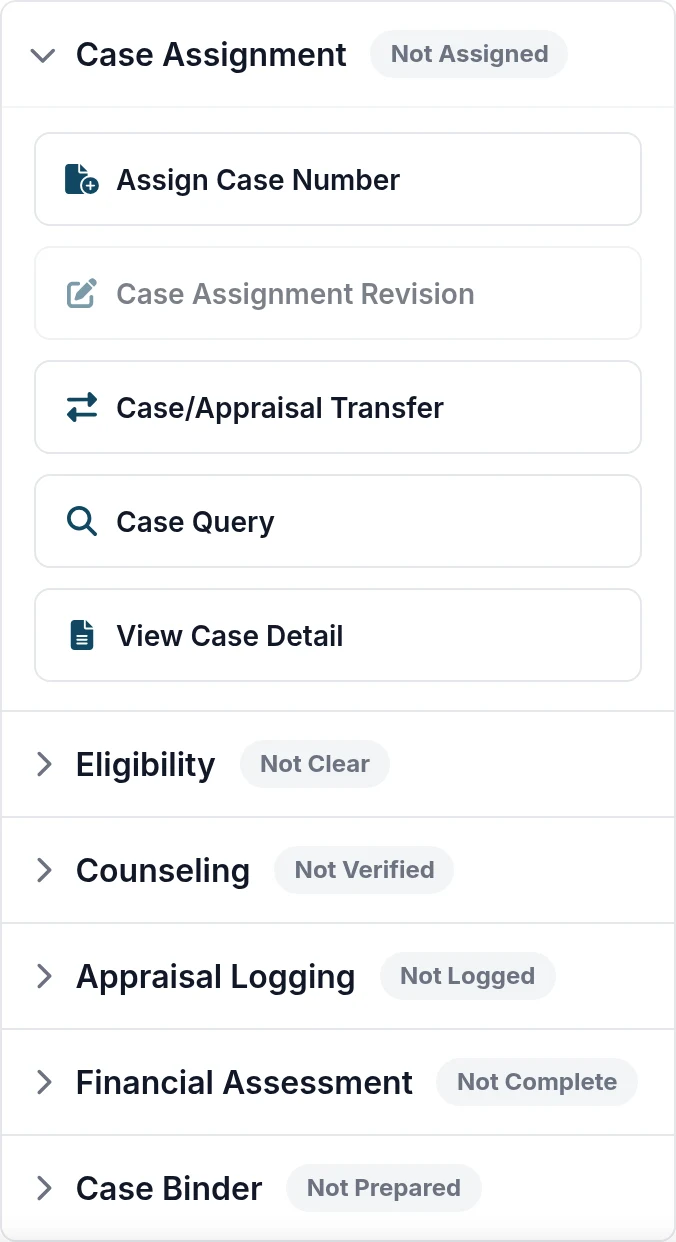
Open the HECM loan in ReversePilot and select the Case Number tab. The Case Assignment section shows Not Assigned until a case number is assigned.
Step 2: Click Assign Case Number
Click the "Assign Case Number" button. ReversePilot will send a case number request to FHA Connection with your property and loan information.
Step 3: Confirm assignment
Once the FHA responds, ReversePilot automatically stores the assigned case number in your loan record. The case number is now available for use in subsequent operations like appraisal logging, financial assessment submission, and insurance applications.
Note. Case number assignment requires complete property address information (street name, number, city, state, and postal code) and a valid loan purpose type. If any required fields are missing, ReversePilot will return an error.
Typical HECM Workflow
ReversePilot guides you through a logical workflow for HECM loans:
- Address Validation — Confirm the property address sent to HUD: use HUD's suggested address or keep the address as entered.
- Case Number Assignment — Request and store your FHA case number.
- Financial Assessment — Complete and submit the borrower's financial assessment.
- Appraisal Logging — Log the property appraisal with the FHA.
- Insurance Application — Submit the HECM insurance application.
- Certificate Retrieval — Retrieve your HECM certificate once processing is complete.
Key Features
The FHA Connection integration includes the following capabilities:
- Address Validation — Checks the property address with HUD and lets you choose HUD's suggested address or keep yours.
- Case Number Assignment — Assigns FHA case numbers to HECM loans.
- Certificate Search — Searches for HECM certificates in FHA Connection.
- Financial Assessment Submission — Submits financial assessment data to the FHA.
- Insurance Application Processing — Submits HECM insurance applications.
- Case Transfer and Restore — Transfers cases to other lenders or restores cancelled cases.
- Appraisal Logging — Logs appraisal information with the FHA.
- CAIRVS Authorization — Requests Credit Alert Interactive Voice Response System authorization.
- Duplicate MIC Check — Checks for duplicate Mortgage Insurance Certificates.
- Escrow Closeout — Processes escrow closeout for completed loans.
Troubleshooting
Credentials Not Found
Problem: You receive an error that FHA Connection credentials are not configured.
Solution:
- Open your Profile and check the FHA Connection card. It shows Connected, or lists what is still missing.
- Ensure both the username and password are correct and complete.
- If the card says the FHA Lender ID is missing, ask your Company Administrator to add it on the Company Profile page.
Connection Errors
Problem: ReversePilot cannot connect to FHA Connection.
Solution:
- Check your network connectivity and firewall settings.
- Verify that the FHA Connection service is operational (check FHA status pages if available).
- Check the loan's Case Number tab for the result of the last request before you try again.
- If the error persists, contact FHA Connection support.
Invalid Responses
Problem: FHA Connection returns an unexpected error or invalid response.
Solution:
- Review your loan data to ensure all required fields are complete and accurate.
- Verify that property address, borrower information, and loan purpose are valid and match FHA requirements.
- Consult the FHA Connection documentation or contact support if the issue continues.
Best Practices
- Validate addresses early — Run Address Validation early so the property address HUD uses is settled before you request a case number.
- Assign case numbers promptly — Request your FHA case number as soon as address validation is complete, so you have it for all downstream operations.
- Complete all required data — Ensure all required loan and borrower data is entered and accurate before submitting to FHA Connection.
- Monitor FHA responses — Check integration responses after each FHA Connection operation to confirm success and catch errors early.
- Document issues — Keep notes on any integration errors or unusual FHA responses to help diagnose patterns over time.
Security and Credentials
FHA Connection credentials are sensitive sign-in details. Keep them to yourself:
- Each user's B2G credentials are linked from that user's own Profile; a saved password is not displayed again.
- When you change your B2G password in FHA Connection, save the new password in your Profile too.
Was this article helpful?
Your feedback goes directly to the engineer who wrote it.