

Setting up credit report retrieval
ReversePilot integrates with MeridianLink to automatically retrieve credit reports from all three major bureaus for reverse mortgage applications. Configure your company's MeridianLink credentials and order reports directly from the loan application.

Overview
ReversePilot's MeridianLink credit integration lets your team order individual or joint credit reports, or retrieve a report already ordered through MeridianLink, from the loan's Credit Report tab.
What the integration does
- Orders individual and joint credit reports through the provider you choose
- Retrieves existing reports ordered outside ReversePilot, using the MeridianLink order number
- Shows the returned report on the Credit Report tab
- Lets you download the report as a PDF or Excel file
Prerequisites
Your company must have active credentials with MeridianLink, a credit reporting service provider. Contact MeridianLink to obtain the following:
- The name of the credit company (reseller) MeridianLink issued your organization, for example SettlementOne or CIC Direct
- Its
Request Endpoint URLand, if issued,OAuth Token URL - Its
MCL-Interface,Client IdandClient Secret, and theUsernameandPasswordif your provider uses them
A Company Administrator enters these details under Settings › Third Party Integrations › Meridian Link. The Access Level column on that page shows whether the integration is set up company-wide or individually.
Configuring company credentials
Step 1: Open Third Party Integrations
As a Company Administrator, open Settings, search for third party and open Third Party Integrations.
Step 2: Add a credit provider
Expand Meridian Link and select Add credit provider. Enter the Provider Name and the endpoint and credential fields your credit company issued. Tick Default provider for the provider loan officers should use when they don't pick one.
Step 3: Save and test
Select Add provider to save it, then use Test on the provider's row to check the connection. Saved secrets show as configured instead of being displayed.
Ordering credit reports
For individual borrowers
Step 1: Open the loan application
Navigate to the reverse mortgage application for the borrower.
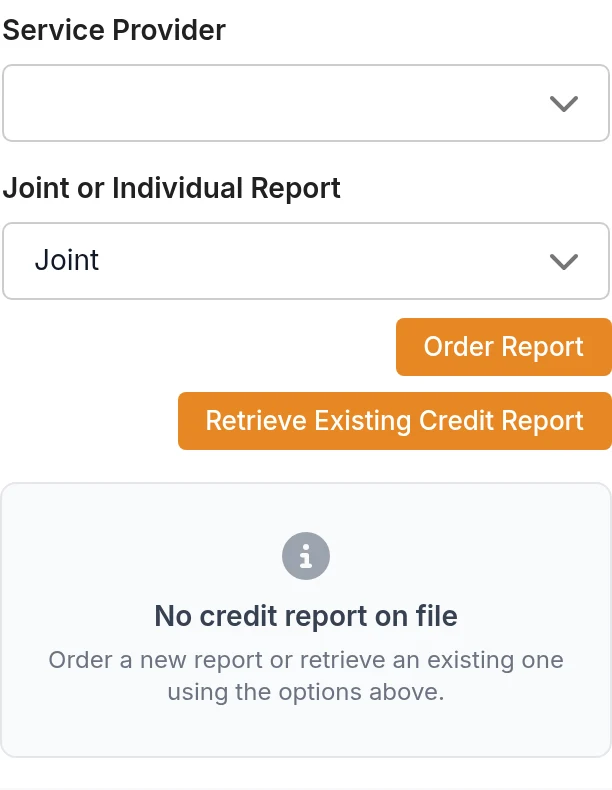
Step 2: Open the Credit Report tab
On the Borrowers tab, select Credit Report.
Step 3: Order the report
Choose the Service Provider, set Joint or Individual Report to Individual, and select Order Report. When the report comes back, review it on the Credit Report tab.
For joint applications
Step 1: Open the loan application
Navigate to the reverse mortgage application.
Step 2: Open the Credit Report tab
On the Borrowers tab, select Credit Report.
Step 3: Order the joint report
Choose the Service Provider, set Joint or Individual Report to Joint, and select Order Report. When the report comes back, review it on the Credit Report tab.
Retrieving existing reports
If a credit report was ordered outside of ReversePilot but exists in your MeridianLink account, you can retrieve it using the Order Identifier (the MeridianLink order number).
Step 1: Open the Credit Report tab
Open the loan, go to the Borrowers tab and select Credit Report.
Step 2: Select retrieve option
Click "Retrieve Existing Credit Report".
Step 3: Enter the order number
In Order Number, enter the MeridianLink order number.
Step 4: Retrieve the report
Confirm the dialog, then review the report returned by your provider on the Credit Report tab.
Reviewing the report
When a report is on file, the Credit Report tab shows these sections:
- Credit Scores, with columns for Equifax, Experian and TransUnion
- Credit Analysis, with Past 12 Months and Prior 24 Months columns
- Account Information, listing the accounts on the report
Review the report returned by your provider. Use Download Report PDF or Download Excel to save a copy for your loan file.
Troubleshooting
Credit report won't order
Possible causes:
- MeridianLink credentials not configured or invalid
- Borrower information is incomplete (missing name, SSN, or address)
- Network connectivity issues
- MeridianLink service outage
Solutions:
- Ask your Company Administrator to check the provider under Settings › Third Party Integrations › Meridian Link and run Test on its row
- Ensure the borrower's name, Social Security Number, and address are complete and accurate
- Check your network connection
- If the problem persists, contact MeridianLink support
Credit report not received
Possible causes:
- Processing delay from MeridianLink
- Invalid or incomplete borrower information
- MeridianLink processing error
Solutions:
- Wait a few minutes and refresh the page
- Verify that borrower information is accurate, especially name spelling and SSN
- Check for error messages on the Credit Report tab
- Check the order's status under Orders or with your provider before you request the report again
Missing or incomplete credit data
Possible causes:
- Incomplete credit report from the bureau
- A problem reading the report into ReversePilot
Solutions:
- Select Download Report PDF and compare it with what the Credit Report tab shows
- Contact ReversePilot support if data appears to be missing despite being in the original report
Best practices
- Order early: Pull credit reports early in the application process to identify potential issues sooner
- Verify borrower information: Ensure all borrower details (name, address, SSN) are accurate before ordering
- Review reports: Always review credit reports for accuracy, especially public records and liabilities
- Document issues: Document any credit issues or discrepancies for your loan file
- Check before reordering: If an order fails or seems stuck, check its status before you request another report
Was this article helpful?
Your feedback goes directly to the engineer who wrote it.