

Filing Mortgage Call Reports (MCR)
Mortgage Call Reports (MCRs) are required quarterly reports submitted to NMLS for mortgage companies. Learn how ReversePilot streamlines MCR generation, validation, and submission.

What are Mortgage Call Reports?
Mortgage Call Reports (MCRs) are quarterly regulatory reports required by the Nationwide Multistate Licensing System (NMLS) for mortgage companies. These reports provide detailed information about loan applications, closings, origination activity, and loan officer performance during each quarter.
Timely and accurate MCR filing is essential for maintaining compliance with regulatory requirements. Reports must be submitted within 45 days of the quarter end.
MCR Report Sections
ReversePilot organizes MCR data into eight distinct sections, each capturing critical aspects of your quarterly lending activity:
- Application Data — Loan applications received during the quarter, including application dates and statuses, along with borrower and property information
- Closed Loan Data — Loans closed during the quarter, including closing dates, amounts, and loan product information
- Purpose of Reverse Mortgage — Borrower's stated purpose for the loan, cash-out amounts, and payoff information
- Fee Information — Origination fees, third-party fees, and detailed fee breakdowns
- Forward and Reverse Mortgage Loans — Loan type breakdown, product information, and loan amounts
- Revenue Data — Revenue from loan origination, fee revenue, and other revenue sources
- MLO Data — Mortgage Loan Originator information, loan officer licensing details, and activity by MLO
- Loan List — Detailed list of all loans with loan identifiers and status information
Quarterly Reporting Schedule
MCR reports align with standard calendar quarters:
- Q1: January 1 — March 31
- Q2: April 1 — June 30
- Q3: July 1 — September 30
- Q4: October 1 — December 31
Reports are due within 45 days of quarter end. Check the NMLS platform for specific deadlines applicable to your organization and file well before the deadline to allow time for review and corrections.
Generating an MCR Report
Step 1: Navigate to MCR Reporting
In ReversePilot, go to the Reports section and select Mortgage Call Report.
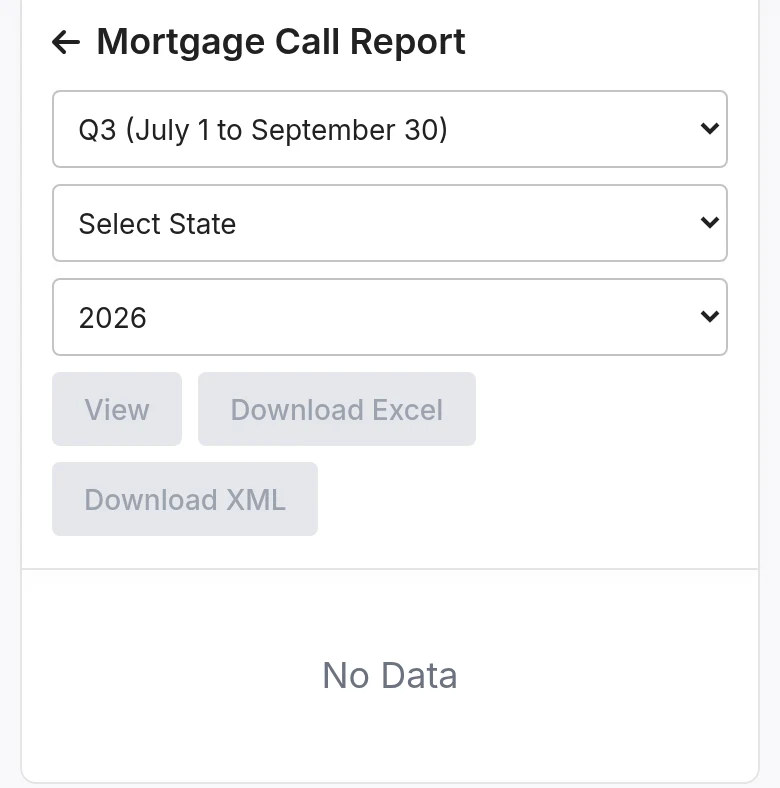
Step 2: Enter Reporting Parameters
Specify the reporting period and scope:
- Select Period: Choose Q1 (Jan 1 to March 31), Q2, Q3 or Q4
- Select State: Choose one state, or All States
- Select Year: Choose the reporting year
Step 3: View or download
Choose how you want the report:
- View: Shows the report on screen for review.
- Download Excel: Saves the report as an Excel file.
- Download XML: Saves the report as an XML file.
These buttons stay disabled until the period, state and year are selected.
Step 4: Review
Review the generated report carefully to verify data accuracy, confirm all sections are complete, check the loan list, and validate totals.
Data Requirements and Validation
To ensure a complete and accurate MCR report, ReversePilot requires:
- Loan Applications: All applications received during the quarter
- Closed Loans: All loans closed during the quarter with accurate closing dates
- Loan Officers: MLO information and current licensing details
- Fees: Complete and accurate fee information for all loans
- Revenue Data: Complete revenue information
ReversePilot automatically validates:
- Data completeness
- Required fields are present
- Data format compliance
- Calculation accuracy
Submitting to NMLS
Once your MCR report is generated and reviewed, follow these steps to submit to NMLS:
- Generate Report: Generate your MCR report in ReversePilot
- Review Data: Verify all data is accurate and complete
- Upload to NMLS: Log in to the NMLS platform, navigate to the MCR section, and upload your generated report file
- Verify Submission: Confirm successful submission in the NMLS system
- Retain Records: Keep copies of all submitted reports for your compliance records
If you encounter submission errors, verify that your file format is correct, check NMLS platform requirements, review submission instructions, and contact NMLS support if issues persist.
Troubleshooting Common Issues
Missing Loan Data
Problem: Expected loans are not included in the generated report.
Solution:
- Verify that loan dates fall within the selected reporting quarter
- Check that loan statuses are correct and loans are not deleted
- Confirm you have the necessary permissions to view the loans
Incomplete Fee Information
Problem: Fee data is missing or incomplete in the report.
Solution:
- Ensure fee information is complete for all loans in the reporting period
- Verify that fee amounts are accurate
- Review fee calculations in the system
MLO Data Issues
Problem: Loan officer information is missing or incomplete.
Solution:
- Verify that a loan officer is properly assigned to each loan
- Check that MLO licensing information is complete and current
- Ensure the NMLS ID is entered for all loan officers
Report Generation Failures
Problem: The system cannot generate the report.
Solution:
- Verify you have permission to generate mortgage call reports
- Confirm that quarter, year, and state parameters are valid
- Ensure that loans exist for the specified period
- Contact your administrator if issues persist
Best Practices
- Generate Early: Generate reports well before the 45-day deadline to allow time for review and corrections
- Review Thoroughly: Review all report sections before submission to catch any errors or discrepancies
- Validate Data: Use ReversePilot's built-in validation features to ensure accuracy
- Maintain Records: Keep copies of all generated and submitted reports for compliance and audit purposes
- Stay Current: Keep up with NMLS requirements and regulatory changes that may affect your reporting
Additional Resources
- NMLS Resource Center: Official NMLS documentation and MCR filing guides
- NMLS MCR Instructions: Detailed filing instructions from NMLS
- NMLS Support: Contact NMLS directly for assistance with submission or compliance questions
Was this article helpful?
Your feedback goes directly to the engineer who wrote it.